Purchase County-wide Street Maps
Knox, Lincoln, Sagadahoc, & Waldo Counties - Maine
|
The Knox County Maps
The Lincoln County Maps
The Sagadahoc County Maps
The Waldo County Maps
Press
Map Home
|
Tiling from a PDF File with Adobe Acrobat
|
1. Open the PDF file using Adobe Acrobat.
2. Open the Print.. Dialog from the FILE menu
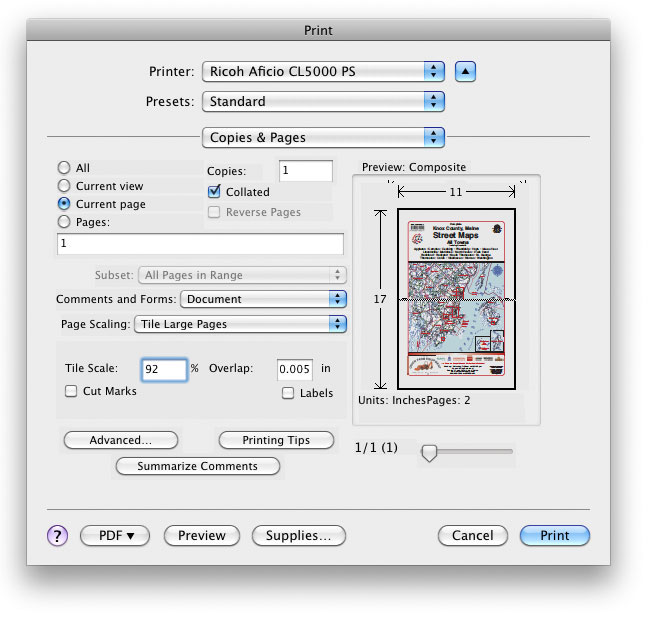
Notice that this setup will print the current ledger page page onto two sheets of letter size paper. In the Preview box, there is a dotted line where the cut will be made. Note also that it is necessary to set the Tile Scale to 92% in order to fit the image into the printer's margin boundaries for letter size. If the scale were not slightly reduced to accomodate the printer, the Preview box would show that a 100% scale printout would take four pieces of letter sized paper, not two. Experiment with all of your settings.
|
|
Copyright © 2004-2024 by Tay Vaughan. All Rights Reserved. |
|
